Two-Factor Authentication (2FA)
What is 2FA?
2FA generates a unique 6-digit code (referred to as a one-time password or OTP) every 30 seconds, with each code valid only for that interval. To sign in, a user must enter the correct username, password and 2FA code before it expires. This process ensures that the person accessing the account also has access to the authenticator generating the codes.
Organisation Administrators may request to enforce 2FA across their entire Organisation by contacting Marine Data Hub Support.
Configuring 2FA
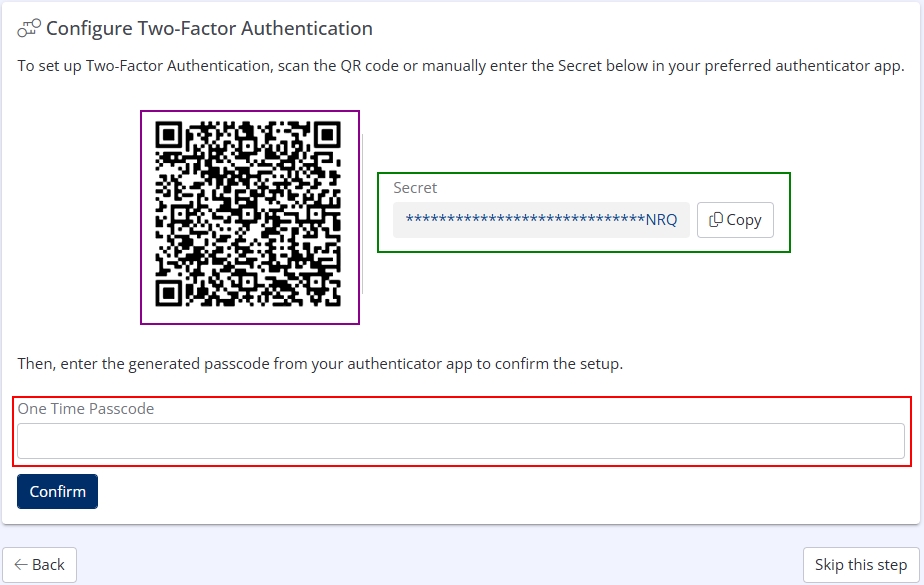
When logging into Hub, if 2FA is enabled for your Organisation you will be presented with a QR code and Secret.
Use either the QR Code or Secret, only one is required for configuration.
Do not keep a record of the QR Code or Secret, they are only required once and doing so may compromise your account.
The QR code is recommended if using a mobile device as an authenticator, and the Secret is recommended when using a desktop application such as a password manager.
Input the Secret into or scan the QR Code with your chosen authenticator. Enter the provided OTP into the One Time Passcode field and click Confirm.
Once a correct OTP has been supplied on the configuration screen, you will be logged in to Hub.
Additional login attempts will require a new OTP to be supplied each time.