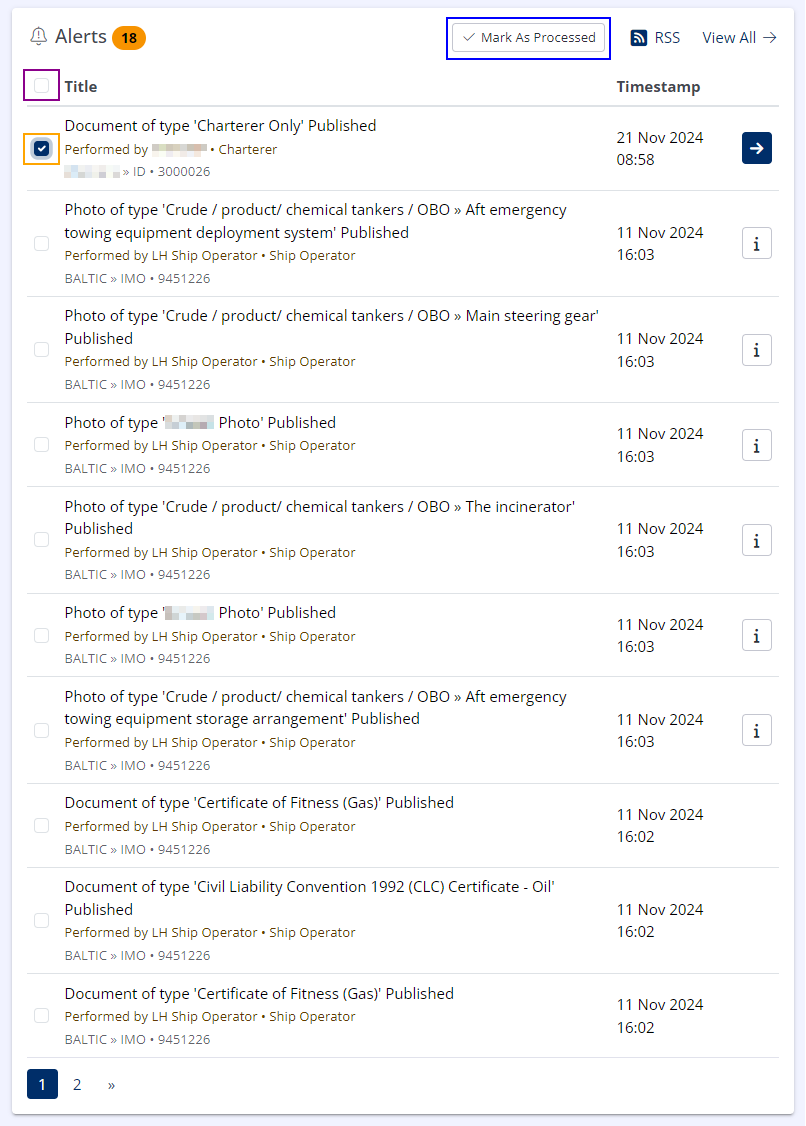
Dashboard Alerts Module
Recent Alerts are displayed on the dashboard.
Viewing Additional Alert Details
Certain Alert types will have additional context that can be viewed by clicking the appropriate button (button ( )/).
Processing Alerts
Alerts may be processed (cleared) in order to remove them from the dashboard module.
To process an Alert:
-
Select the appropriate checkbox.
-
Click Mark As Processed.
To process all current alerts:
-
Select the "Select / Deselect All Alerts" checkbox in the upper-left corner.
-
Click Mark As Processed.
Alerts cannot be restored once they have been processed.
Processing Alerts for all Organisation Users
By default, alerts are only processed for the current user however, Organisation Administrators may configure Alerts to be processed for all Organisation users.
For more information see Organisation Settings.
RSS Token
If RSS Feeds are enabled for the organisation, users can obtain their unique RSS token from this module by clicking the RSS icon( )
For more information see Alerts RSS Feed.