Managing an Existing Dialogue
Participants can be added to or removed from a Dialogue at any time after its creation providing the Dialogue has not been archived.
The Participants panel can be found on the right-hand side of the page, and will list all current Dialogue participants.
Only the Dialogue Owner may add/remove Participants or change Dialogue Status. If your Organisation utilises User Groups, then any user in the owning User Group may make these changes.
Removing a Participant
To remove a participant, click the Remove participant button ( ).
).
The Participant will be immediately removed from the Dialogue, and any Hub Reports assigned to the Participant will be unassigned.
Adding a Participant
To add a participant, click the Add participant button ( ), and in the drop-down menu that appears, select either E-mail Address, or Hub Member.
For an explanation of participant types, see Creating a Dialogue.
Adding Files
Additional files may be added to a Dialogue after its creation, by any participant.
-
Attach any relevant files to the Dialogue by clicking the icon and drag & dropping or selecting files from your device.
- Any files attached in this step will be included in the initial Dialogue message. Any replies from active participants may also include file attachments.
You may wish to consider a Data Share for sharing Documents & Photos with other users.
Archiving or Completing a Dialogue
The Dialogue owner may Archive or Complete a Dialogue when it is no longer needed.
Any associated Hub Reports must be completed in the Hub Reports panel before a Dialogue may be Completed or Archived
Completed vs Archived Dialogues
Completed: Dialogues (and associated Reports) that are Completed will not be displayed on the Hub Dashboard, but are otherwise still visible.
Archived: Dialogues (and associated Reports) that are Archived are not visible to any participant or the Owner, but may still be found by searching the relevant index for Archived Dialogues.
Dialogues that are Completed or Archived can be re-opened at any time.
Restrictions on Adding Participants
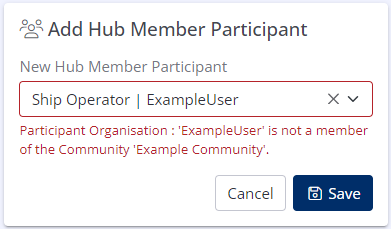
If a Dialogue is linked to a Community and has a Community Hub Report assigned, it is not possible to add Email participants, or Hub Participants who are not members of the associated Community.